Frequently Asked Questions
- Details
- By Jamie Cresdee
- Category: Frequently Asked Questions
- Hits: 111
Overview
This article serves as a comprehensive guide to our current portfolio of Cisco Security Workshops. Each course is meticulously designed to provide technical professionals with immersive, lab-based learning experiences. Whether you are looking to master Cisco Secure Firewall, dive deep into Zero Trust architecture, or enhance your incident response capabilities with Cisco XDR, these workshops offer the guided practice necessary to implement and manage robust security solutions effectively.
Courses: Hybrid Mesh Firewall / Secure Firewall
Hybrid Mesh Firewall: Project Meteor
Course Description
Lead PseudoCo’s Project Meteor, a hands-on modernization effort powered by Cisco’s Hybrid Mesh Firewall. Across three phases, you’ll onboard firewalls, simplify branch connectivity, integrate cloud policies, and configure segmentation for workloads and apps. By the end, you’ll see how Hybrid Mesh Firewall unifies security across data center, cloud, and campus—giving you practical experience in protecting a global enterprise at scale.
Course Owner: Jamie Cresdee
Link to Guide: https://ciscosecurityworkshop.com/workshops/course/view.php?id=267
Enrollment:
Self-Enrollment (Guide)
-
- Enrollment key (Cisco) = Emp_El3vate_HMF
- Enrollment key (Partner) = Prt_El3vate_HMF
Self-Enrollment (Lab)
-
- Self-contained within guide (requires Cisco authentication for access)
Scheduling an Event
-
- Open for scheduling anytime
Foundation Firewall Test Drive 10.0.0
Course Description
Get hands-on with Cisco Secure Firewall basics in this guided lab. Configure FMC, create objects and security zones, register devices, and define policies for malware protection, decryption, and intrusion prevention. Step through access control rules and visibility features to see how each piece fits together. These fundamentals prepare you for advanced labs and give you the core skills to design and manage deployments with confidence.
Course Owner: Deepak Sharma
Link to Guide: https://ciscosecurityworkshop.com/workshops/course/view.php?id=282
Enrollment:
Self-Enrollment (Guide)
-
- Enrollment key (Cisco) = FFTD10_Employee
- Enrollment key (Partner) = FFTD10_p4tners
Self-Enrollment (Lab)
-
- TBC
Scheduling an Event
-
- TBC
Advanced Firewall Test Drive 10.0.0
Course Description
Take Cisco Secure Firewall beyond the basics in this advanced hands-on lab. Explore Zero Trust Access, policy-based routing with user identity, and SD-WAN integration with VRF and dynamic tunnels. Test dashboards for VPNs, run packet tracing, and dive into threat labs with tools like AttackIQ and Caldera. You’ll finish with the skills to design and operate a firewall strategy that’s smarter, stronger, and ready for modern threats.
Course Owner: Deepak Sharma
Link to Guide: https://ciscosecurityworkshop.com/workshops/course/view.php?id=283
Enrollment:
Self-Enrollment (Guide)
-
- Enrollment key (Cisco) = FATD_10_Employee
- Enrollment key (Partner) = FATD_10_Partner
Self-Enrollment (Lab)
-
- TBC
Scheduling an Event
-
- TBC
Foundation Firewall Test Drive 7.6
Course Description
Get hands-on with Cisco Secure Firewall basics in this guided lab. Configure FMC, create objects and security zones, register devices, and define policies for malware protection, decryption, and intrusion prevention. Step through access control rules and visibility features to see how each piece fits together. These fundamentals prepare you for advanced labs and give you the core skills to design and manage deployments with confidence.
Workshop Owner: Deepak Sharma
Link to Workshop Guide: https://ciscosecurityworkshop.com/workshops/course/view.php?id=243
Enrollment:
Self-Enrollment (Guide)
-
- Enrollment key (Cisco) = FFTD76_Employee
- Enrollment key (Partner) = FFTD76_p4tners
Self-Enrollment (Lab)
-
- TBC
Scheduling an Event
-
- TBC
Advanced Firewall Test Drive 7.6
Course Description
Take Cisco Secure Firewall beyond the basics in this advanced hands-on lab. Explore Zero Trust Access, policy-based routing with user identity, and SD-WAN integration with VRF and dynamic tunnels. Test dashboards for VPNs, run packet tracing, and dive into threat labs with tools like AttackIQ and Caldera. You’ll finish with the skills to design and operate a firewall strategy that’s smarter, stronger, and ready for modern threats.
Workshop Owner: Deepak Sharma
Link to Workshop Guide: https://ciscosecurityworkshop.com/workshops/course/view.php?id=235
Enrollment:
Self-Enrollment (Guide)
-
- Enrollment key (Cisco) = FATD_76_Employee
- Enrollment key (Partner) = FATD_76_Partner
Self-Enrollment (Lab)
-
- TBC
Scheduling an Event
-
- TBC
Cisco Secure Workload 3.10 Lab v1.4 Security Cloud Control
Course Description
In this interactive and hands-on workshop, you'll secure the SIWAPP invoice app using Zero Trust Micro-segmentation. You'll use Secure Workload to automatically find and suggest segmentation policies based on traffic and get visibility into runtime to detect vulnerable packages and container images.
Workshop Owner: Leonardo Milher
Link to Workshop Guide: https://ciscosecurityworkshop.com/workshops/course/view.php?id=299
enrollment:
Self-Enrollment (Guide)
-
- TBC
Self-Enrollment (Lab)
-
- Self-contained within guide (requires Cisco authentication for access)
Scheduling an Event
-
- Open for scheduling anytime
Cisco Secure Workload 3.10: Firepower Management Center Integration
Course Description
Discover how this powerful duo delivers dynamic microsegmentation, automated policy enforcement, and robust threat protection—securing your workloads seamlessly across hybrid environments. Get ready to simplify security and boost application defense with unified, adaptive protection.
Workshop Owner: Leonardo Milher
Link to Workshop Guide: https://ciscosecurityworkshop.com/workshops/course/view.php?id=289
Enrollment:
Self-Enrollment (Guide)
-
- TBC
Self-Enrollment (Lab)
-
- Self-contained within guide (requires Cisco authentication for access)
Scheduling an Event
-
- Open for scheduling anytime
Hybrid Mesh Firewall Design Clinic
Course Description
In this interactive design workshop, Cisco experts work with your team to map your current firewall landscape and explore how Hybrid Mesh Firewall can bring it all together. Through discussion and whiteboarding, you’ll identify integration opportunities, improve visibility, and outline a roadmap toward unified management. The result: stronger security, simplified operations, and reduced complexity across your network.
Workshop Owner: Ahalya Das
Link to Workshop Guide: https://ciscosecurityworkshop.com/workshops/course/view.php?id=276
Enrollment:
Self-Enrollment (Guide)
-
- Enrollment key (Cisco) = HMFDC3nrollMe!
- Enrollment key (Partner) = Partn3r_HMFDC_enroll
Self-Enrollment (Lab)
-
- No lab within this course
Scheduling an Event
-
- Open for scheduling anytime
Unlocking the Power of Cisco Secure Firewall 10.0
Course Description
Experience the latest innovations in Cisco Secure Firewall 10.0 in this lab. Discover how the Encrypted Visibility Engine (EVE) enables threat detection in encrypted traffic, while AI-driven SnortML provides protection against signature-less attacks. Take advantage of expanded SD-WAN features and improved OT security with advanced access control and containment. Seamless Splunk integration delivers robust security analytics for effective incident response. This lab will help you build the knowledge and skills needed to highlight the strengths of Cisco Secure Firewall 10.0.
Workshop Owner: Deepak Sharma
Link to Workshop Guide: https://ciscosecurityworkshop.com/workshops/course/view.php?id=318
Enrollment:
Self-Enrollment (Guide)
-
- TBC
Self-Enrollment (Lab)
-
- TBC
Scheduling an Event
-
- TBC
ReIgnite with Hybrid Mesh Firewall
Course Description
This lab brings you back to the core of Hybrid Mesh Firewall while layering in modern capabilities. You’ll register devices, run threat assessments with Caldera, and test encrypted visibility without decryption. Dive into SD-WAN with simplified branch-to-hub tunnels and policy-based routing, then explore AI-driven assistants for policy analysis and optimization. Finally, integrate segmentation across firewall and workload for unified control. Walk away with refreshed skills and new insights to strengthen firewall strategy in today’s evolving networks.
Workshop Owner: Deepak Sharma
Link to Workshop Guide: https://ciscosecurityworkshop.com/workshops/course/view.php?id=242
Enrollment:
Self-Enrollment (Guide)
-
- Not self-enrollable [ Coming Soon!]
Self-Enrollment (Lab)
-
- dCloud Lab: Cisco Secure Hybrid Mesh Firewalling Re-Ignite Roadshow Lab
Scheduling an Event
-
- TBC
Courses: Zero Trust Access / Secure Access
Cisco Secure Access: Zero Trust Access Lab v1
Course Description
Step into the role of administrator at PseudoCo and design a modern Secure Service Edge with Cisco Secure Access. Configure secure connectivity between remote users and private apps, integrate identity services like Active Directory and Duo, and enable SAML-based authentication. Along the way, you’ll validate tunnels, monitor performance with ThousandEyes, and test access end-to-end—leaving with the confidence to deliver Zero Trust access seamlessly and securely.
Workshop Owner: Andy Peterson
Link to Workshop Guide: https://ciscosecurityworkshop.com/workshops/course/view.php?id=292
Enrollment:
Self-Enrollment (Guide)
-
- Enrollment key (Cisco) = CSAZTAHOL26_Employee
- Enrollment key (Partner) = CSA_ZTA_hands-on-26-0
Self-Enrollment (Lab)
-
- dCloud Lab: Cisco Secure Access: Zero Trust Access Lab v1
- Schedule dCloud Lab Resources for Single Session Learning or Multi-Session Events (available in all dCloud Data Centers):
- https://dcloud2.cisco.com/content/demo/secure-access-zero-trust-access-lab
Scheduling an Event
-
- TBC
Zero Trust Design Clinic
Course Description
In this interactive design workshop, Cisco experts work with your team to map your current security solutions landscape and explore how Zero Trust Access can bring it all together. Through discussion and whiteboarding, you’ll identify integration opportunities, improve visibility, and outline a roadmap toward unified management. The result: stronger security, simplified operations, and reduced complexity across your network.
Workshop Owner: Andy Peterson
Link to Workshop Guide: https://ciscosecurityworkshop.com/workshops/course/view.php?id=290
Enrollment:
Self-Enrollment (Guide)
-
- Enrollment key (Cisco) = ZTADC3nrollMe!
- Enrollment key (Partner) = Partn3r_ZTADC_enroll
Self-Enrollment (Lab)
-
- No lab within this course
Scheduling an Event
-
- Open for scheduling anytime
Cisco Secure Access: Secure Services Edge (SSE) Experience
Course Description
See how Cisco Secure Access delivers modern Security Service Edge with a seamless user experience. In this guided lab, you’ll walk through real-world scenarios as an end user, experiencing frictionless access to apps and data from any device.
Explore capabilities like Zero Trust Network Access, VPN as a Service, secure web filtering, malware defense, and data protection—all managed from a single cloud-based console. With read-only access, you’ll see how Secure Access simplifies IT operations while enforcing consistent, cloud-delivered security at scale.
Workshop Owner: Andy Peterson
Link to Workshop Guide: https://ciscosecurityworkshop.com/workshops/course/view.php?id=232
Enrollment:
Self-Enrollment (Guide)
-
- Enrollment key (Cisco) = SA-SS3_Exp-Employee
- Enrollment key (Partner) = CSA_SSE_Partn3r
- Unlock Code (required in section 1.1): sseforthee
Self-Enrollment (Lab)
-
- Schedule dCloud Lab Resources for Single Session Learning or Multi-Session Events (available in all dCloud Data Centers): https://dcloud2.cisco.com/content/demo/cisco-secure-access-end-user-experience-v1-2
Scheduling an Event
-
- TBC
Cisco Secure Access Advanced Lab
Course Description
See how Cisco Secure Access simplifies protection for users, devices, and applications through a unified, cloud-delivered architecture. In this guided lab, you’ll explore zero trust innovations that reduce risk with granular controls while ensuring a seamless user experience. Walk away with clear insight into how IT can centralize security, improve visibility, and operate with greater efficiency in the hybrid world.
Workshop Owner: Andy Peterson
Link to Workshop Guide: https://ciscosecurityworkshop.com/workshops/course/view.php?id=229
Enrollment:
Self-Enrollment (Guide)
-
- Not self-enrollable - Cisco employees, ping the SAA admins (
This email address is being protected from spambots. You need JavaScript enabled to view it. ) for access. Partners - reach out to your Channel SE.
- Not self-enrollable - Cisco employees, ping the SAA admins (
Self-Enrollment (Lab)
-
- TBC
Scheduling an Event
-
- TBC
Umbrella Studio 3.0
Course Description
Step into the world of Secure Access Service Edge (SASE) with Cisco Umbrella. In this lab, you’ll deploy Umbrella from DNS protection to a full Secure Web Gateway, using Cisco’s dCloud environment to simulate real-world conditions. Learn how to connect users, devices, and branches securely while enforcing consistent policies across the internet edge. By the end, you’ll be ready to deliver modern security that follows your users anywhere they go.
Workshop Owner: Chris Riviere / Shaun Furey
Link to Workshop Guide: https://ciscosecurityworkshop.com/workshops/course/view.php?id=201
Enrollment:
Self-Enrollment (Guide)
-
- Enrollment key (Cisco) = Umbr3lla_Studio_Employee
- Enrollment key (Partner) = Umbr3lla_Studio_p4tner
Self-Enrollment (Lab)
-
- dCloud Lab: Cisco Zero Trust Lab v3.0
Scheduling an Event
-
- TBC
SOC / Threat
Purple Teaming with Cisco XDR
Course Description
Switch from attacker to defender in this instructor-led lab. Use a preconfigured pod to launch phishing-based intrusions mapped to MITRE TTPs, then pivot to blue-team work with Secure Firewall, Secure Network Analytics, Secure Email, and Cisco XDR. You’ll experience the full purple-team loop—attack, detect, investigate, and remediate—building hands-on skills that strengthen defenses where it counts.
Workshop Owner: Oxana Sannikova
Link to Workshop Guide: https://ciscosecurityworkshop.com/workshops/course/view.php?id=270
Enrollment:
Self-Enrollment (Guide)
-
- Enrollment key (Cisco) = Purple_CvJWgs78i
- Enrollment key (Partner) = Partn3r_Purples
Self-Enrollment (Lab)
-
- dCloud Lab: Purple Teaming with Cisco XDR
Scheduling an Event
-
- TBC
Rapid Incident Response v7
Course Description
Cyber threats move fast—can you respond even faster? Join our Rapid Incident Response Workshop and master the art of detecting and neutralizing threats in minutes, not weeks. Get hands-on with Cisco XDR, tackle live threat scenarios, sharpen your threat triage skills, and connect with cybersecurity experts. Whether you're in IT, security operations, or threat hunting, this workshop will arm you with the tools and insights to stay ahead of cyber adversaries. Don't just react—hunt threats with confidence!
Workshop Owner: Kevin Mast
Link to Workshop Guide: https://ciscosecurityworkshop.com/workshops/course/view.php?id=250
Enrollment:
Self-Enrollment (Guide)
-
- Enrollment key (Cisco) = Enroll_rir_v7!
- Enrollment key (Partner) = Partner_enroll_rir_v7!
Self-Enrollment (Lab)
-
- TBC
Scheduling an Event
-
- TBC
XDR Proof of Value
Course Description
Designed to provide a structured framework for executing a successful POV with customers. This course will help you make your POV more effective, impressive, realistic, faster, and ultimately successful.
Workshop Owner: Cam Dunn
Link to Workshop Guide: https://ciscosecurityworkshop.com/workshops/course/view.php?id=255
Enrollment:
Self-Enrollment (Guide)
-
- Enrollment key (Cisco) = XDR_P0V_emp
- Enrollment key (Partner) = XDR_P0V_ptnr
Self-Enrollment (Lab)
-
- TBC
Scheduling an Event
-
- TBC
- Details
- By Mike Simone
- Category: Frequently Asked Questions
- Hits: 97
Overview
Sometimes, you just want to go through one of the courses, and you don't want to go through the hassle of finding the course author to get enrolled in it. While most courses are self-paced, some require a proctor. The purpose of this article is to give employees and partners a way to enroll in the base courses (not the Train the Trainers) without having to track down the course owner.
Courses
Devnet
-
- Devnet Security Workshop
- https://ciscosecurityworkshop.com/workshops/course/view.php?id=233
- Enrollment key (Cisco) = D3v_Net_Employeez
- Enrollment key (Partner) = D3v_N3T_Partner
- Devnet Security Workshop
Firewall
-
- Firewall Foundational Test Drive 7.6
- Yes, it annoys me that it comes alphabetically after Firewall Advanced, but needs to be completed first.
- https://ciscosecurityworkshop.com/workshops/course/view.php?id=243
- Enrollment key (Cisco) = FFTD76_Employee
- Enrollment key (Partner) = FFTD76_p4tners
- Firewall Advanced Test Drive 7.6
- https://ciscosecurityworkshop.com/workshops/course/view.php?id=235
- Enrollment key (Cisco) = FATD_76_Employee
- Enrollment key (Partner) = FATD_76_Partner
- Hybrid Mesh Firewall Design Clinic
- Automatically enrolled in Train the Trainer after completing HMFDC course
- https://ciscosecurityworkshop.com/workshops/course/view.php?id=276
- Enrollment key (Cisco) = HMFDC3nrollMe!
- Enrollment key (Partner) = Partn3r_HMFDC_enroll
- ReIgnite with Hybrid Mesh Firewall
- https://ciscosecurityworkshop.com/workshops/course/view.php?id=242
- Enrollment key (Cisco) = FY25Roadshow8421!@#
- Enrollment key (Partner) = FY26Partner8421!#@
- Tech Elevate Hybrid Mesh Firewall
- https://ciscosecurityworkshop.com/workshops/course/view.php?id=267
- Enrollment key (Cisco) = Emp_El3vate_HMF
- Enrollment key (Partner) = Prt_El3vate_HMF
- Firewall Foundational Test Drive 7.6
Secure Access / Secure Service Edge
-
- Cisco Secure Access / Secure Service Edge Experience
- https://ciscosecurityworkshop.com/workshops/course/view.php?id=232
- Enrollment key (Cisco) = SA-SS3_Exp-Employee
- Enrollment key (Partner) = CSA_SSE_Partn3r
- Cisco Secure Access Advanced Access Lab
- https://ciscosecurityworkshop.com/workshops/course/view.php?id=229
- Not self-enrollable
- SASE Studio v2
- https://ciscosecurityworkshop.com/workshops/course/view.php?id=172
- Enrollment key (Cisco) = S4S3_v2_emp
- Enrollment key (Partner) = S4S3_v2_partner
- SASE Workshop v2.1
- https://ciscosecurityworkshop.com/workshops/course/view.php?id=171
- Enrollment key (Cisco) = SASEW_3mployee
- Enrollment key (Partner) = SASEW_p4tn3r
- Secure Access Premier (LTRSEC 2767)
- https://ciscosecurityworkshop.com/workshops/enrol/instances.php?id=264
- Enrollment key (Cisco) = LTRSEC2676_Employee
- Enrollment key (Partner) = CSA_Premier_2676
- Cisco Secure Access / Secure Service Edge Experience
Secure Network Analytics
-
- Cisco Secure Network Analytics Test Drive 7.4.1
- https://ciscosecurityworkshop.com/workshops/course/view.php?id=193
- Enrollment key (Cisco) = SNA_TD_3nroll
- Enrollment key (Partner) = SNATD_Partn3r
- Cisco Secure Network Analytics Test Drive 7.4.1
Secure Workload
-
- Cisco Secure Workload 3.9
- https://ciscosecurityworkshop.com/workshops/course/view.php?id=237
- Not self-enrollable
- Cisco Secure Workload 3.9
Umbrella
-
- Umbrella Studio v3.0
- https://ciscosecurityworkshop.com/workshops/course/view.php?id=201
- Enrollment key (Cisco) = Umbr3lla_Studio_Employee
- Enrollment key (Partner) = Umbr3lla_Studio_p4tner
- Umbrella Studio v3.0
XDR
-
- Purple Teaming with Cisco XDR
- https://ciscosecurityworkshop.com/workshops/course/view.php?id=270
- Enrollment key (Cisco) = Purple_CvJWgs78i
- Enrollment key (Partner) = Partn3r_Purples
- Rapid Incident Response v7 - Internal (Cisco Only)
- Must complete the RIR7, will automatically enroll in the Train the Trainer upon completion.
- https://ciscosecurityworkshop.com/workshops/course/view.php?id=250
- Enrollment key (Cisco) = Enroll_rir_v7!
- Enrollment key (Partner) = Partner_enroll_rir_v7!
- XDR Proof of Value
- https://ciscosecurityworkshop.com/workshops/course/view.php?id=255
- Enrollment key (Cisco) = XDR_P0V_emp
- Enrollment key (Partner) = XDR_P0V_ptnr
- Purple Teaming with Cisco XDR
- Details
- By Kevin Mast
- Category: Frequently Asked Questions
- Hits: 504
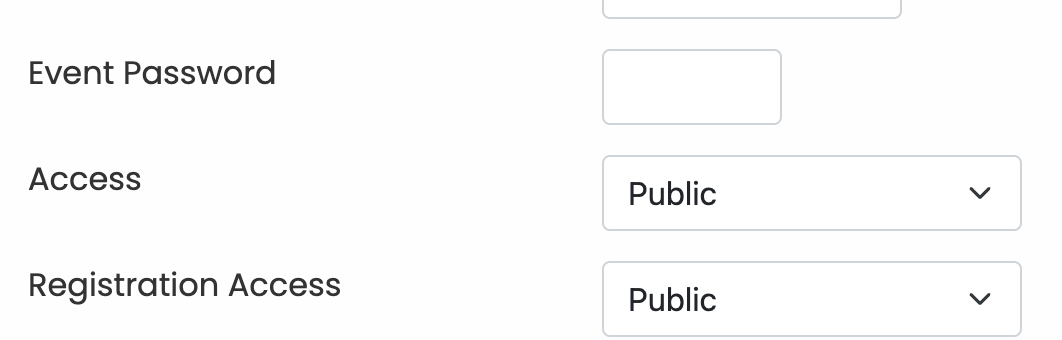
There are 3 fields that allow you to control who can register and see an event you create.
Event Password - this allows the creator to set a custom password on the event registration. Only individuals that enter the password will be able to register for the event
Access - this is a drop down that allows the creator to set permissions on how the event is viewable. Default setting is Public, this will allow the event to be shared via url without needing to be logged into the platform to see the details. Other options available are Registered and Employees. Registered would require the user be logged into the workshops platform to see the event. Employees would require that the user be logged in and be part of the Employees groups to see the event.
Registration Access - Default is Public this allows users to either login and register if they have an existing account. lf they do not have an account on the site it will present them with the option of registering for the event and automatically create their account at the same time. You could also set this to Employees which would limit the ability to register for the event to just members of the Employees group.
- Details
- By Brandon Newport
- Category: Frequently Asked Questions
- Hits: 541
Yes. The easiest way to accomplish this is by having the new proctor register for the event. However the proctor must be certified in order to be listed as a proctor in the backend system. This will also not remove the original proctor from event information.
Page 1 of 4